Beginner

SPI Communication

Learn Serial Peripheral Interface (SPI) protocol fundamentals, implementation, and practical applications with microcontrollers. Master everything from basic architecture to real-world sensor integration.

1. Introduction to SPI

Serial Peripheral Interface (SPI) is a synchronous serial communication protocol used to exchange data between microcontrollers and peripheral devices such as sensors, displays, and memory modules. Unlike asynchronous protocols like UART, SPI requires a clock signal to synchronize data transmission, making it faster and more reliable for short-distance communication.

SPI is widely used in embedded systems because of its simplicity, high speed capability, and widespread hardware support across microcontroller platforms.

Key Advantage: SPI can achieve data rates up to 10 Mbps or higher, making it ideal for real-time applications requiring fast data transfer.

2. SPI Basics and Architecture

Signal Lines

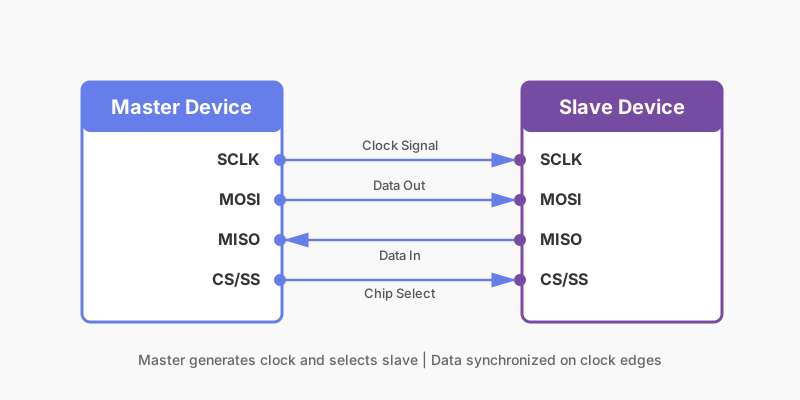
SPI uses four main signal lines for communication:

  • SCLK (Serial Clock): Clock signal generated by the master to synchronize data transfer
  • MOSI (Master Out, Slave In): Data line from master to slave(s)
  • MISO (Master In, Slave Out): Data line from slave(s) to master
  • CS/SS (Chip Select/Slave Select): Control line to select which slave device to communicate with
SPI Master-Slave Communication Diagram
Full-Duplex Communication

SPI is inherently full-duplex, meaning data can be transmitted and received simultaneously. On each clock pulse, one bit is transmitted from master to slave via MOSI while one bit is received from slave to master via MISO.

3. Master-Slave Configuration

SPI operates on a master-slave architecture where one device (master) controls the communication and all other devices (slaves) respond to the master's requests.

Master Responsibilities
  • Generates the clock signal (SCLK)
  • Initiates communication by pulling CS low for desired slave
  • Controls the frequency and timing of data transfer
  • Reads data from slaves and writes data to slaves
Slave Responsibilities
  • Monitors the CS line for selection
  • Synchronizes data transfer using the clock from master
  • Responds to master requests
  • Cannot initiate communication
Multi-Slave Setup: Multiple slaves can share the same SCLK, MOSI, and MISO lines. Each slave has its own dedicated CS line pulled low to select it.

4. Clock Polarity and Phase (CPOL & CPHA)

SPI has four modes determined by two parameters: Clock Polarity (CPOL) and Clock Phase (CPHA). Both master and slave must use the same mode for successful communication.

Mode CPOL CPHA Description
0 0 0 Clock idle low, data captured on leading edge
1 0 1 Clock idle low, data captured on trailing edge
2 1 0 Clock idle high, data captured on leading edge
3 1 1 Clock idle high, data captured on trailing edge
Understanding CPOL
  • CPOL = 0: Clock signal is low when idle
  • CPOL = 1: Clock signal is high when idle
Understanding CPHA
  • CPHA = 0: Data is captured on the leading edge of the clock
  • CPHA = 1: Data is captured on the trailing edge of the clock
Most Common: SPI Mode 0 (CPOL=0, CPHA=0) is the most widely used configuration in microcontroller projects and is the default for Arduino SPI library.

5. Interfacing Sensors and Displays

SPI is used to interface various peripherals with microcontrollers. Common applications include accelerometers, temperature sensors, SD cards, and LCD displays.

Common SPI Devices
  • OLED/LCD Displays: Fast pixel updates via SPI
  • Accelerometers (MPU-6050, ADXL345): Real-time motion sensing
  • Temperature Sensors (MAX31855): Thermocouple to digital conversion
  • Flash Memory (W25Q64): Non-volatile data storage
  • SD Cards: Mass storage with high-speed SPI mode
  • ADC/DAC Converters: Analog to digital and vice versa
Best Practices for Device Integration
  • Always check the device datasheet for clock polarity and phase requirements
  • Use appropriate pull-up resistors on CS lines
  • Keep SPI bus wires as short as possible to minimize noise
  • Add decoupling capacitors near device power pins
  • Verify baud rate compatibility before communication

6. Code Examples

Arduino SPI Communication

Basic SPI master example reading from an SPI slave device:

Arduino (Master Device)
#include <SPI.h>

const int chipSelect = 10; // CS pin

void setup() {
Serial.begin(9600);

// Initialize SPI
SPI.begin();
SPI.setClockDivider(SPI_CLOCK_DIV16);
SPI.setDataMode(SPI_MODE0); // Mode 0: CPOL=0, CPHA=0

pinMode(chipSelect, OUTPUT);
digitalWrite(chipSelect, HIGH); // Deselect initially
}

void loop() {
// Select slave
digitalWrite(chipSelect, LOW);
delayMicroseconds(10);

// Send command and read response
byte response = SPI.transfer(0xAA); // Send 0xAA, read response

Serial.print("Response: 0x");
Serial.println(response, HEX);

// Deselect slave
digitalWrite(chipSelect, HIGH);
delayMicroseconds(10);

delay(500);
}
STM32 SPI Communication

SPI configuration using STM32CubeMX generated code:

STM32 (HAL Library)
void SPI_Init(void) {
// SPI1 is configured via CubeMX
// PA5 = SCLK, PA6 = MISO, PA7 = MOSI, PA4 = CS

hspi1.Instance = SPI1;
hspi1.Init.Mode = SPI_MODE_MASTER;
hspi1.Init.Direction = SPI_DIRECTION_2LINES;
hspi1.Init.DataSize = SPI_DATASIZE_8BIT;
hspi1.Init.CLKPolarity = SPI_POLARITY_LOW;
hspi1.Init.CLKPhase = SPI_PHASE_1EDGE;
hspi1.Init.NSS = SPI_NSS_SOFT;
hspi1.Init.BaudRatePrescaler = SPI_BAUDRATEPRESCALER_16;
hspi1.Init.FirstBit = SPI_FIRSTBIT_MSB;

HAL_SPI_Init(&hspi1);
}

void SPI_Write(uint8_t data) {
HAL_GPIO_WritePin(GPIOA, GPIO_PIN_4, GPIO_PIN_RESET);
HAL_SPI_Transmit(&hspi1, &data, 1, HAL_MAX_DELAY);
HAL_GPIO_WritePin(GPIOA, GPIO_PIN_4, GPIO_PIN_SET);
}
Reading from SPI Sensor (ADXL345 Accelerometer)
Complete Read Sequence
// ADXL345 register addresses
#define ADXL345_DEVID 0x00
#define ADXL345_DATAX0 0x32

uint8_t readADXL345Register(uint8_t reg) {
digitalWrite(chipSelect, LOW);

// For read operation, set MSB to 1
SPI.transfer(0x80 | reg); // Read mode
uint8_t value = SPI.transfer(0x00); // Read data

digitalWrite(chipSelect, HIGH);
return value;
}

void setup() {
Serial.begin(9600);
SPI.begin();
SPI.setClockDivider(SPI_CLOCK_DIV16);
pinMode(chipSelect, OUTPUT);
digitalWrite(chipSelect, HIGH);
}

void loop() {
// Read device ID
uint8_t deviceID = readADXL345Register(ADXL345_DEVID);
Serial.print("Device ID: 0x");
Serial.println(deviceID, HEX);

delay(1000);
}
7. Advantages and Disadvantages

Advantages
  • High speed communication (up to 10 Mbps or more)
  • Full-duplex transmission capability
  • Simple hardware implementation
  • No need for complex protocol like CAN
  • Easy to use with microcontroller SPI hardware
  • Multiple slave support with chip select
Disadvantages
  • Master-only initiation (slaves cannot request data)
  • Requires more wires compared to I2C
  • No built-in error checking mechanism
  • Limited to short distances (typically <1 meter)
  • No acknowledgment protocol
  • Requires separate chip select for each slave

8. Summary and Next Steps

You've learned the fundamentals of SPI communication including:

  • Basic architecture with four signal lines
  • Master-slave communication model
  • Clock polarity and phase configurations
  • Practical sensor and display interfacing
  • Code implementation on Arduino and STM32
Next Steps: Try interfacing an OLED display or SD card module using SPI. Experiment with different clock speeds and SPI modes. Practice reading real sensor data and storing it to memory.